Webhooks
After a document has been signed it can be delivered back to your system.
Definition of terms
The following keys are needed to work with webhooks.
companyKeythe baseKey used to identify a company.flowKeyThere can be many flows each with its own delivery methods registered.webhookSignatureKeyThe key used to sign every webhook delivery. Use it to verify that Taktikal sent the webhook and that the body was not changed. In the Taktikal portal, open Settings, then Integrations. The key is under Authentication keys, labelled Webhook Signature Key, next to your Company Key and API Key. It is shown to users who can update the company settings.
Webhook
The data Taktikal sends via webhook are wrapped in a WebhookEventPayload
object that has an Id, EventData, and EventSignature See example data
below.
EventSignatureis deprecated, see EventSignature (deprecated). Verify the signature headers described in Verifying webhooks instead.EventDatacontains allsigneethat signed the document and all their personal information provided in this process. The signed document is stored as a base64 string in the fieldSignedDocument
Taktikal will send a POST request to the registered URL when an event occurs and expects an HTTP Status code 200 Response. For all other response codes, Taktikal Will retry two more times. Unless an HTTP Status code 406 (not accepted) is received that marks that we will not try again.
Webhook event types
Taktikal sents out webhook events for Created, SignedDocument, AllSigned,
Canceled or Expired,
| Event name | Event description | contains document | integer value |
|---|---|---|---|
Created | This is an event that is triggerd when a new signing process is created. | 🔴 | 11 |
SignedDocument | This is an event that is run for each signing except the last one. | 🔴 | 1 |
AllSigned | This is an event triggered on the last signature. | ✅ | 2 |
Canceled | This is an event that is run when a signing process is canceled. | 🔴 | 5 |
Expired | each signing process needs to be signed within 30 days. If it expires this event will be triggered | ✅ | 6 |
Verifying webhooks
Every webhook delivery is signed with the Standard Webhooks scheme. Verify the signature before you trust or process a payload.
Signature headers
Each POST request carries three headers:
| Header | Value |
|---|---|
webhook-id | The id of the event, the same value as EventSignature.Guid. It is the same on every retry and resend of the event. |
webhook-timestamp | Unix time in seconds when the delivery attempt was made. It is new on every attempt, including retries and resends. |
webhook-signature | v1, followed by the base64 encoded signature, for example v1,Y7dqAJ9/bXEjQVzAdgfGBjd1tBIURRz6EkkMT1DP/lY=. |
The signature is an HMAC-SHA256 of
{webhook-id}.{webhook-timestamp}.{raw request body}
keyed with your webhookSignatureKey.
Use the key as it is, as UTF-8 bytes, without base64 decoding it.
The raw request body is part of the signed content, so any change to it, including parsing and re-serializing the JSON, invalidates the signature.
Standard Webhooks allows several space-separated signatures in webhook-signature.
Check every entry that starts with v1, and ignore the others.
To verify a delivery:
- Read the raw request body, see Reading the raw body.
- Reject the request if
webhook-timestampis more than 5 minutes away from your clock, in either direction. - Compute the signature and compare it with the
v1,entries inwebhook-signatureusing a constant-time comparison. - Ignore the event if you have already processed its
webhook-id, see De-duplicating events.
Using a library
Standard Webhooks has verification libraries for many languages, for example Svix for .NET and standardwebhooks for JavaScript.
They check the signature in constant time and enforce the 5 minute timestamp window.
The libraries take the secret as whsec_ followed by the base64 encoding of the key bytes.
For your webhookSignatureKey that is whsec_ + base64 of the UTF-8 bytes of the key.
Svix for .NET also accepts the UTF-8 bytes of the key directly.
- C#
- TypeScript
using System.Net;
using System.Text;
using Svix;
using Svix.Exceptions;

var keyBytes = Encoding.UTF8.GetBytes(webhookSignatureKey);
var webhook = new Webhook(keyBytes);
// or pass the whsec_ form instead:
// "whsec_" + Convert.ToBase64String(keyBytes)

bool IsValid(
    string rawBody, string id, string timestamp, string signature)
{
    var headers = new WebHeaderCollection
    {
        { "webhook-id", id },
        { "webhook-timestamp", timestamp },
        { "webhook-signature", signature },
    };

    try
    {
        webhook.Verify(rawBody, headers);
        return true;
    }
    catch (WebhookVerificationException)
    {
        return false;
    }
}
import {
  Webhook,
  WebhookVerificationError,
} from "standardwebhooks";

const secret =
  "whsec_" +
  Buffer.from(webhookSignatureKey, "utf8").toString("base64");
const webhook = new Webhook(secret);

function isValid(
  rawBody: string | Buffer,
  headers: Record<string, string>,
) {
  try {
    webhook.verify(rawBody, headers);
    return true;
  } catch (err) {
    if (err instanceof WebhookVerificationError) return false;
    throw err;
  }
}
Verifying manually
If there is no library for your language, the algorithm is short. These examples implement the steps above.
- C#
- Node.js
using System.Security.Cryptography;
using System.Text;

public static class TaktikalWebhook
{
    private const long ToleranceSeconds = 5 * 60;

    public static bool IsValid(
        string id, string timestamp, string signatureHeader,
        byte[] rawBody, string webhookSignatureKey,
        DateTimeOffset now)
    {
        if (!long.TryParse(timestamp, out var seconds))
            return false;

        var age = Math.Abs(now.ToUnixTimeSeconds() - seconds);
        if (age > ToleranceSeconds) return false;

        var prefix = Encoding.UTF8.GetBytes($"{id}.{timestamp}.");
        var signedContent = prefix.Concat(rawBody).ToArray();
        var key = Encoding.UTF8.GetBytes(webhookSignatureKey);
        var expected = HMACSHA256.HashData(key, signedContent);

        var entries = signatureHeader.Split(
            ' ', StringSplitOptions.RemoveEmptyEntries);
        foreach (var entry in entries)
        {
            var parts = entry.Split(',', 2);
            if (parts.Length != 2 || parts[0] != "v1") continue;

            var candidate = new byte[expected.Length];
            if (Convert.TryFromBase64String(
                    parts[1], candidate, out var written)
                && written == expected.Length
                && CryptographicOperations.FixedTimeEquals(
                    candidate, expected))
            {
                return true;
            }
        }

        return false;
    }
}
import crypto from "node:crypto";

const TOLERANCE_SECONDS = 5 * 60;

export function isValid(
  rawBody: Buffer,
  headers: Record<string, string | string[] | undefined>,
  webhookSignatureKey: string,
  nowSeconds: number = Date.now() / 1000,
): boolean {
  const id = headers["webhook-id"];
  const timestamp = headers["webhook-timestamp"];
  const signatureHeader = headers["webhook-signature"];
  if (typeof id !== "string") return false;
  if (typeof timestamp !== "string") return false;
  if (typeof signatureHeader !== "string") return false;

  const seconds = Number(timestamp);
  if (!Number.isInteger(seconds)) return false;
  const age = Math.abs(nowSeconds - seconds);
  if (age > TOLERANCE_SECONDS) return false;

  const expected = crypto
    .createHmac("sha256", Buffer.from(webhookSignatureKey, "utf8"))
    .update(`${id}.${timestamp}.`)
    .update(rawBody)
    .digest();

  return signatureHeader.split(" ").some((entry) => {
    const [version, signature] = entry.split(",");
    if (version !== "v1" || !signature) return false;

    const candidate = Buffer.from(signature, "base64");
    return (
      candidate.length === expected.length &&
      crypto.timingSafeEqual(candidate, expected)
    );
  });
}
You can check your implementation against this delivery.
The timestamp is old, so pass it as the current time when you run the examples above:
DateTimeOffset.FromUnixTimeSeconds(1793014494) in C#, or 1793014494 as nowSeconds in Node.js.
| Field | Value |
|---|---|
webhookSignatureKey | my-webhook-signature-key |
webhook-id | e7a1624b-d49c-4f30-80b5-0676ac858b77 |
webhook-timestamp | 1793014494 |
| Raw body | {"Id":"e7a1624b-d49c-4f30-80b5-0676ac858b77","EventType":2} |
webhook-signature | v1,Y7dqAJ9/bXEjQVzAdgfGBjd1tBIURRz6EkkMT1DP/lY= |
Reading the raw body
The signature covers the exact bytes Taktikal sent. Most web frameworks parse a JSON body before your code runs, and serializing the parsed object again does not give the same bytes. Read the body as it arrived and only parse it after it has been verified.
A delivery that carries the signed document includes the PDF as base64 in the body, so it can be several megabytes.
Check the request body size limit of your server or framework.
The Node.js examples below are TypeScript. In a JavaScript project, delete the type annotations and as casts.
- Express
- Next.js
- ASP.NET Core
Use express.raw on the webhook route.
If you register express.json() for the whole app, register this route before it, or make sure the JSON parser skips the route, since a body that has already been parsed cannot be read raw.
req.body is then a Buffer with the original bytes.
express.raw rejects bodies over 100 kb by default with a 413 response, which is too small for a delivery that carries a PDF.
Set limit to the largest document you expect.
import express from "express";
import { Webhook } from "standardwebhooks";

const webhookSignatureKey = process.env.WEBHOOK_SIGNATURE_KEY!;
const secret =
  "whsec_" +
  Buffer.from(webhookSignatureKey, "utf8").toString("base64");
const webhook = new Webhook(secret);

const app = express();

app.post(
  "/webhooks/taktikal",
  express.raw({ type: "application/json", limit: "50mb" }),
  (req, res) => {
    try {
      webhook.verify(
        req.body,
        req.headers as Record<string, string>,
      );
    } catch {
      return res.status(401).send("Invalid signature");
    }

    const event = JSON.parse(req.body.toString("utf8"));
    // queue the event, then respond
    res.sendStatus(200);
  },
);
In an App Router route handler, read the body with request.text() and do not call request.json() first.
// app/api/webhooks/taktikal/route.ts
import { Webhook } from "standardwebhooks";

const webhookSignatureKey = process.env.WEBHOOK_SIGNATURE_KEY!;
const secret =
  "whsec_" +
  Buffer.from(webhookSignatureKey, "utf8").toString("base64");
const webhook = new Webhook(secret);

export async function POST(request: Request) {
  const rawBody = await request.text();

  try {
    webhook.verify(rawBody, Object.fromEntries(request.headers));
  } catch {
    return new Response("Invalid signature", { status: 401 });
  }

  const event = JSON.parse(rawBody);
  // queue the event, then respond
  return new Response(null, { status: 200 });
}
In the Pages Router, API routes parse the body by default. Turn that off for the webhook route and read the request stream yourself.
// pages/api/webhooks/taktikal.ts
import type { NextApiRequest, NextApiResponse } from "next";
import { Webhook } from "standardwebhooks";

export const config = { api: { bodyParser: false } };

const webhookSignatureKey = process.env.WEBHOOK_SIGNATURE_KEY!;
const secret =
  "whsec_" +
  Buffer.from(webhookSignatureKey, "utf8").toString("base64");
const webhook = new Webhook(secret);

export default async function handler(
  req: NextApiRequest,
  res: NextApiResponse,
) {
  const chunks: Buffer[] = [];
  for await (const chunk of req) chunks.push(chunk);
  const rawBody = Buffer.concat(chunks);

  try {
    webhook.verify(
      rawBody,
      req.headers as Record<string, string>,
    );
  } catch {
    return res.status(401).send("Invalid signature");
  }

  const event = JSON.parse(rawBody.toString("utf8"));
  // queue the event, then respond
  res.status(200).end();
}
Do not bind the request to a model with [FromBody] or a typed minimal API parameter, since model binding consumes the body and gives you a deserialized object.
Read Request.Body yourself, verify, then deserialize.
Kestrel rejects request bodies over about 30 MB by default.
Raise MaxRequestBodySize in the Kestrel limits if you expect larger documents.
using System.Net;
using System.Text;
using Svix;
using Svix.Exceptions;

var builder = WebApplication.CreateBuilder(args);
var app = builder.Build();

var webhookSignatureKey =
    builder.Configuration["Taktikal:WebhookSignatureKey"]!;
var keyBytes = Encoding.UTF8.GetBytes(webhookSignatureKey);
var webhook = new Webhook(keyBytes);

app.MapPost("/webhooks/taktikal", async (HttpRequest request) =>
{
    using var buffer = new MemoryStream();
    await request.Body.CopyToAsync(buffer);
    var rawBody = Encoding.UTF8.GetString(buffer.ToArray());

    var headers = new WebHeaderCollection();
    string[] names =
        { "webhook-id", "webhook-timestamp", "webhook-signature" };
    foreach (var name in names)
    {
        headers.Add(name, request.Headers[name].ToString());
    }

    try
    {
        webhook.Verify(rawBody, headers);
    }
    catch (WebhookVerificationException)
    {
        return Results.Unauthorized();
    }

    // parse rawBody, queue the event, then respond
    return Results.Ok();
});

app.Run();
To use the manual TaktikalWebhook.IsValid helper instead of Svix, read the body as bytes and pass the three header values:
app.MapPost("/webhooks/taktikal", async (HttpRequest request) =>
{
    using var buffer = new MemoryStream();
    await request.Body.CopyToAsync(buffer);

    var isValid = TaktikalWebhook.IsValid(
        request.Headers["webhook-id"].ToString(),
        request.Headers["webhook-timestamp"].ToString(),
        request.Headers["webhook-signature"].ToString(),
        buffer.ToArray(),
        webhookSignatureKey,
        DateTimeOffset.UtcNow);

    if (!isValid) return Results.Unauthorized();

    // parse the body, queue the event, then respond
    return Results.Ok();
});
In an MVC controller, take no body parameter and read Request.Body the same way.
De-duplicating events
Retries and resends of an event carry the same webhook-id, and your endpoint can receive an event more than once, for example when your 200 response does not reach Taktikal.
Store the webhook-id of every event you process, for example with a unique constraint in your database, and skip events whose id you have already stored.
Do not use webhook-timestamp or the signature for this, since both change on every attempt.
Respond with 200 to a duplicate so that Taktikal stops retrying it.
EventSignature (deprecated)
Every payload still contains the EventSignature object, and it is still sent.
There is no removal date.
It exists for integrations built before the signature headers.
Signatureis the HMAC-SHA256 ofSignedData, keyed with thewebhookSignatureKey.SignedDatais theTimeStampand theGuidconcatenated into a single value.
EventSignature only covers its own TimeStamp and Guid, not the rest of the payload, so it cannot detect a changed EventData.
Existing integrations keep working, but new integrations should not use EventSignature or SignedData, and we recommend moving existing ones to the signature headers.
Register a webhook
The easiest way to register webhooks is through the Taktikal portal at /settings/flows:
On the flows settings page, you can:
- Configure webhook endpoints for each flow
- Set up different webhook URLs for different event types
- Test webhook delivery
- View webhook delivery logs and retry failed deliveries
Alternatively, webhooks can be managed programmatically via the API. All routes can be viewed in Swagger:
Testing webhooks
The Taktikal portal provides a comprehensive webhook testing interface where you can:
- View webhook traffic: See all webhook deliveries for your flows with delivery status, timestamps, and event types
- Inspect payloads: View the complete JSON payload that was sent to your webhook endpoint
- Resend webhooks: Manually trigger webhook deliveries again, even if they were previously successful - useful for testing and debugging
- Monitor delivery status: Check if webhooks were delivered successfully or failed, with detailed error information
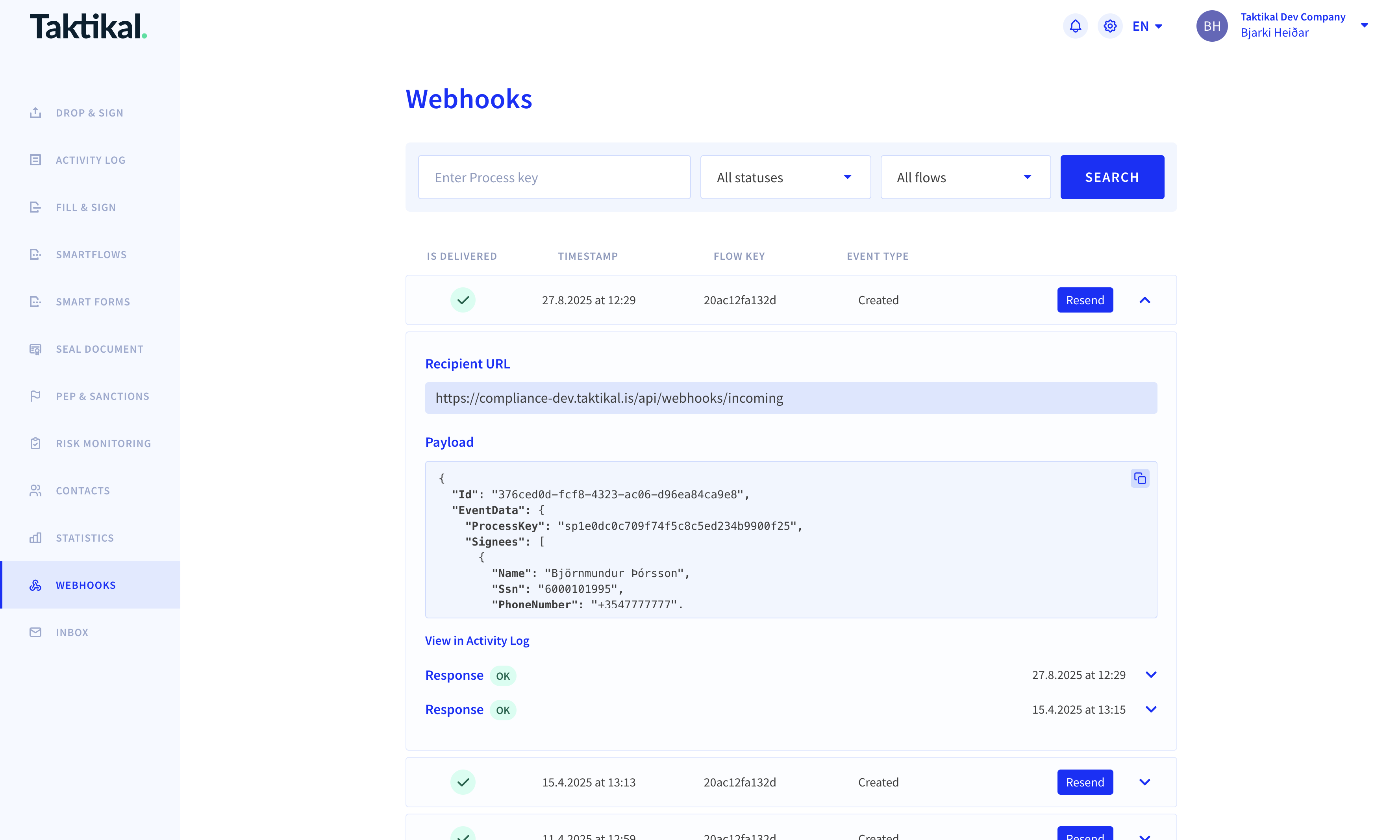
Note: To access the webhook testing interface, your user account must have the following permissions:
- "View activity for other users"
- "View Flow Activity"
This testing functionality is particularly useful when:
- Setting up new webhook endpoints
- Debugging webhook processing issues
- Testing your webhook handling logic
- Verifying webhook payload structure
AttachmentReferences
A signing process can have AttachmentReferences. Each AttachmentReference has
AttachmentType. That can be any of the values in the table
| AttachmentType | Value | Description |
|---|---|---|
| Unspecified | 0 | this is the most common value. It's used for all regular attachments. |
| EvidencePage | 10 | for standart signatures and advanced signatures, an EvidencePage is generated and seald by Taktikal |
| PepPdf | 20 | a PDF file contaning PEP and sactions results for a signee in an AML process that is seald by Taktikal |
| PepJson | 30 | a JSON file contaning PEP and sactions results for a signee in an AML process |
| Verification | 40 | for advanced signatures all attachments related to identify the signee have this attachment type. |
| XmlForSealing | 50 | an xml attachment that is selead and added as an embedded attachment to the PDF when it's signed |
| VerificationMedia | 60 | images that are collected during the ID verification process |
| CompanyInfo | 70 | Company report used in AML processes. compare the answeres to the official company data from the goverment |
Recommended approach
When you receive a webhook event, we recommend that you offload it to your own
message queue service for further processing and respond to us with Http status
code 200.
This minimizes the risk of data loss as any error during processing of message can be seen and replayed within your own infrastructure.
Code examples
Example webhook event
The EventSignature object in this example is deprecated, see EventSignature (deprecated).
The delivery is verified with the signature headers, see Verifying webhooks.
{
  "Id": "2065b6c0-934f-4d18-81d3-46c29b913311",
  "EventData": {
    "ProcessKey": "sp231f52f87d6f4caaa2e29ecac92d055b",
    "CompanyKey": "fae93sfa4sh4",
    "Signees": [
      {
        "Name": "Test User",
        "Ssn": "1234567890",
        "PhoneNumber": "1234567",
        "Email": "testUser@taktikal.com",
        "Address": "Address 5",
        "City": "Gotham City",
        "Key": "si7abef56540bd49f9a9b8a33969a9cf8c",
        "Signed": true,
        "SignedAt": "yyyy-MM-ddTHH:mm:ss.fffffZ",
        "ProcessKey": "sp231f52f87d6f4caaa2e29ecac92d055b",
        "CommunicationDeliveryType": "Email"
      }
    ],
    "FlowKey": "722989cac3fx",
    "FlowName": "Non-disclosure agreement",
    "SignedDocument": "JVBERi0xLjQ...",
    "SignedDocumentDownloadUrl": "https://app.taktikal.is/sp231f52f87d6f4caaa2e29ecac92d055b/si7abef56540bd49f9a9b8a33969a9cf8c.pdf",
    "AttachmentReferences": [
      {
        "Id": "at3357",
        "FileName": "pep-Test User-63f-1.pdf",
        "ContentLength": 90570,
        "ContentType": "application/pdf",
        "Url": "https://app.taktikal.is/attachment/sp231f52f87d6f4caaa2e29ecac92d055b/at3357/pep-Test User-64f-1.pdf",
        "Description": "PEP for Test User",
        "ProcessKey": "sp231f52f87d6f4caaa2e29ecac92d055b",
        "AttachmentType": 20,
        "SigneeKey": "si7abef56540bd49f9a9b8a33969a9cf8c"
      }
    ],
    "EventType": 2, // "AllSigned",
    "Meta": {
      "pdfUrl": "https://fill.dropandsign.is/api/flow/665a62b4a97a/pdf",
      "pdfFieldData": "{\"Nafn\":\"Test User\",\"userInfo\":\"info\",\"ssn\":\"123456-7890\"}"
    }
  },
  "EventSignature": {
    "TimeStamp": 637030223561542290,
    "Guid": "2065b6c0-934f-4d18-81d3-46c29b913311",
    "Signature": "5qN29xaZHKZ65PLMB6ajRgpcxUU9dFRAXhkw36C2d38=",
    "SignedData": "6370302235615422902065b6c0-934f-4d18-81d3-46c29b913311"
  }
}
Payload classes (C#)
using System;
using System.Collections.Generic;

namespace Webhook
{
    public class WebhookEventPayload
    {
        public Guid Id { get; set; }
        public SignedDocumentEventData EventData { get; set; }
        public EventSignature EventSignature { get; set; }
    }

    /// <summary>
    /// Deprecated. Still sent in all webhook payloads. Verify the signature headers instead.
    /// </summary>
    public class EventSignature
    {
        public long TimeStamp { get; set; }
        public string Guid { get; set; }
        public string Signature { get; set; }
        public string SignedData { get; set; }
    }

    public class SignedDocumentEventData
    {
        public string ProcessKey { get; set; }
        public List<Signee> Signees { get; set; }
        public string SignedDocument { get; set; }
        public List<AttachmentReference> AttachmentReferences { get; set; }
        public EventType EventType { get; set; }
        public Dictionary<string, string> Meta { get; set; }
    }

    public class AttachmentReference
    {
        public string Id { get; set; }
        public string FileName { get; set; }
        public long ContentLength { get; set; }
        public string ContentType { get; set; }
        public string Url { get; set; }
        public string Description { get; set; }
        public string ProcessKey { get; set; }

        public AttachmentType AttachmentType { get; set; } = AttachmentType.Unspecified;
        public string SigneeKey { get; set; }
    }

    public enum AttachmentType
    {
        Unspecified = 0,
        EvidencePage = 10,
        PepPdf = 20,
        PepJson = 30,
        Verification = 40,
        XmlForSealing = 50,
        VerificationMedia = 60, // additional data collected during verification
        CompanyInfo = 70
    }

    public enum EventType
    {
        SignedDocument = 1,
        AllSigned = 2,
        Canceled = 5,
        Expired = 6,
        /// <summary>
        /// This is an event that is triggered when all jobs have finished running for a process
        /// </summary>
        Completed = 10,

        /// <summary>
        /// This is an event that is triggered when a process is created to trigger all signingRequests
        /// </summary>
        Created = 11
    }

    public class Signee
    {
        public string Name { get; set; }
        public string Ssn { get; set; }
        public string PhoneNumber { get; set; }
        public string Email { get; set; }
        public string Address { get; set; }
        public string PostalCode { get; set; }
        public string City { get; set; }
        public string Key { get; set; }
        public bool Signed { get; set; }
        public string ProcessKey { get; set; }
        public string CommunicationDeliveryType { get; set; }
    }
}